Posts

Showing posts with the label C#

How to Populate Data from Textbox to Datagridview in C#/CSharp
Image
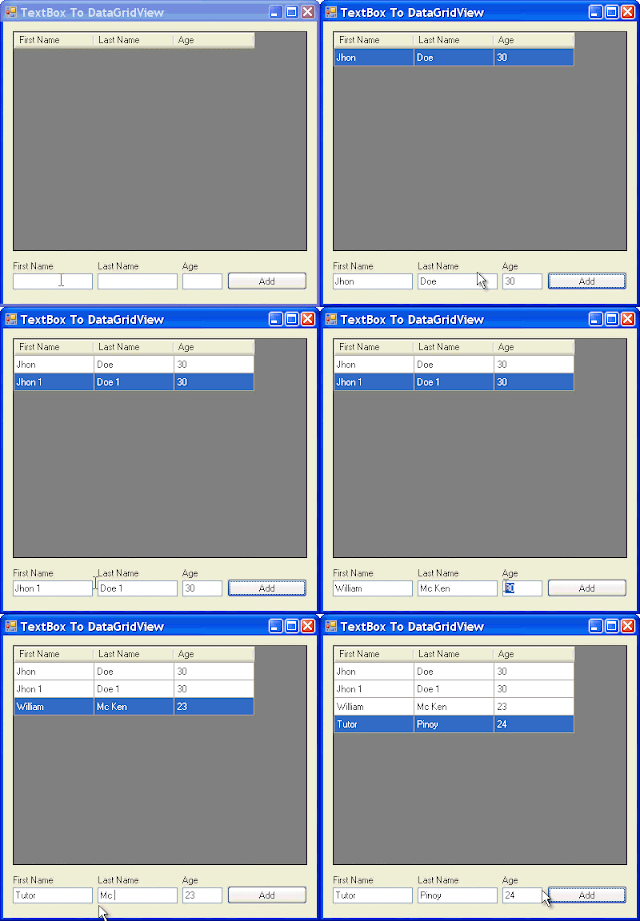
The following example allows you to populate data from a TextBox to DataGridView Control in C#/CSharp. using System; using System.Collections.Generic; using System.Windows.Forms; namespace TextBoxToDataGridView { public partial class Form1 : Form { public Form1() { InitializeComponent(); } private void Form1_Load(object sender, EventArgs e) { DataGridView dgv = this.dataGridView1; //SET DATAGRIDVIEW PROPERTIES dgv.AutoGenerateColumns = false; dgv.AllowUserToAddRows = false; dgv.RowHeadersVisible = false; dgv.MultiSelect = false; //SETS UP THE COLUMN HEADERS dgv.Columns.Add("FName", "First Name"); dgv.Columns.Add("LName", "Last Name"); dgv.Columns.Add("Age", "Age"); } private void btnAdd_Click(object sender, Event...
Populate Website Directory Listing into ListView Control using C#/CSharp

Directory listings are just HTML pages generated by a web server. Each web server generates these HTML pages in its own way because there is no standard way for a web server to list these directories.  The web server you'd like to list directories from must have directory browsing turned on to get this HTML representation of the files in its directories. So you can only get the directory listing if the HTTP server wants you to be able to. [C#] using System; using System.IO; using System.Net; using System.Text; using System.Windows.Forms; using System.Text.RegularExpressions; namespace DirectoryListing { public partial class frmMainDownloader : Form { public frmMainDownloader() { InitializeComponent(); } public static string GetDirectoryListingRegexForUrl(string url) { return "<a href=\".*\">(?<name>.*)</a>"; } private void btnFetchUrl_Click(object ...

Populate Data into DataGridView using DataTable in C#/CSharp

The following snippet allows to populate data into DataGridView Control using DataTable in CSharp. First, we establish a connection to our database. string sConnect = "Data Source=" + Properties.Settings.Default.Server + ";Initial Catalog=" + Properties.Settings.Default.Database + ";"; if (Properties.Settings.Default.UseIntegratedSecurity) sConnect += "Integrated Security=SSPI;"; else sConnect += "User Id=" + Properties.Settings.Default.Username + ";Password=" + Properties.Settings.Default.Password + ";"; this.sSQLConnectString = sConnect; This DataTable returns the Books Table. public DataTable GetBooks() { string sql = "select * from Book order by ISBN13, ISBN10"; SqlDataAdapter da = new SqlDataAdapter(sql, sqlConnection); try { DataTable dt = new DataTable(); da.Fill(dt); return dt; } catch (Exception ex) { throw ex; ...

How to Kill or Start a New Background Process in C#/Csharp

The following snippet allows you to check if a process is already running in the background. If the process is already running it will prompt the user to whether start a new process or continue with the existing one that is running.         private void checkForDataInProgress()         {             if (!this.bConnectedToDatabase)                 return;             Process proc = new Process();             string sNumThreads = Properties.Settings.Default.NumberOfLocalThreads.ToString();             string sProcArgs = "\"" + this.sSQLConnectString + "\" \"" + Properties.Settings.Default.XMLSaveDir + "\" \"" + Properties.Settings.Default.DLLDir + "\" " + sNumThreads;             proc.StartInfo = new ProcessStartInfo(Properties.Settings.Default.DataImporterAp...

Load Data of DataGridView's Selected Row to TextBox Control in C#/CSharp

Image
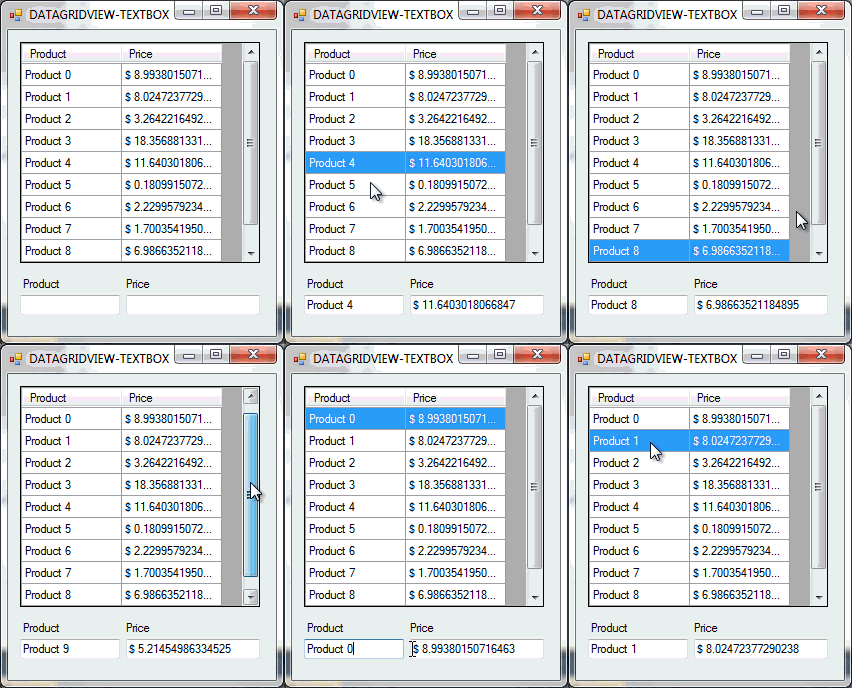
The following example loads the data of the Selected Row in a DataGridView control into a TextBox control in CSharp. As shown on the previous example  Populate Data Into DataGridView using For-Loop in C#/CSharp , we'll use that method to fill our DataGridView with data. To begin with: 1.) Start start a new C# project. 2.) Add the following controls onto Form1. (1) DataGridView Control (2) TextBoxes (2) Labels 3.) Open the Windows Form Designer and Update the DataGridView's generated code with the following. // // dataGridView1 // this.dataGridView1.ColumnHeadersHeightSizeMode = System.Windows.Forms.DataGridViewColumnHeadersHeightSizeMode.AutoSize; this.dataGridView1.Location = new System.Drawing.Point(12, 12); this.dataGridView1.Name = "dataGridView1"; this.dataGridView1.Size = new System.Drawing.Size(240, 221); this.dataGridView1.TabIndex = 0; this.dataGridView1.CellClick += new System.Windows.Forms.DataGridViewCellEventHandler(this.dataGridView1_CellC...

Populate Data Into DataGridView using For-Loop in C#/CSharp

Image
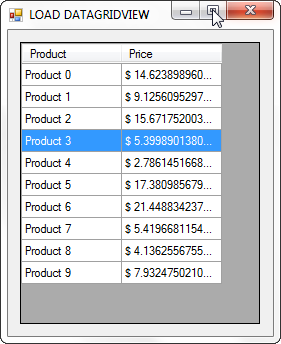
The following example will populate data into a DataGridView Control using For-Loop. To begin with: 1.) Create a new C# Project. 2.) Add a DataGridView Control onto Form1. 3.) Then copy the code below and paste on Form1_Load() event. Random rand = new Random(); DataGridView dgv = this.dataGridView1; //DATAGRIDVIEW SETTING dgv.AllowUserToAddRows = false; dgv.RowHeadersVisible = false; dgv.SelectionMode = DataGridViewSelectionMode.FullRowSelect; //ADD COLUMN HEADERS dgv.Columns.Add("Product", "Product"); dgv.Columns.Add("Price", "Price"); //ADD 10 ROWS dgv.Rows.Add(10); //NOW, POPULATE THE DATA INTO THE CELLS for (int i = 0; i < 10; i++) {     double price = rand.Next(1, 30) * rand.NextDouble();     dgv.Rows[i].Cells[0].Value = "Product " + i;     dgv.Rows[i].Cells[1].Value = "$ " + price; } //CLEARS THE DEFAULT SELECTION WHICH IS THE FIRST ROW dgv.ClearSelection(); 4.) Build and Comp...

Always Show Selected Row of a DataGridView in C# / CSharp

The following codes will always Show the Selected Row of a DatagridView when the data is reloaded and will recall the state of the scrollbar by its scroll value.. CODE: private int scrollVal = 0, rowIndex = 0, lastRow = 0; private void datagridView1_Scroll(object sender, EventArgs e)     {         //WILL USE THE SCROLL VALUE LATER WHEN RELOADING THE DATAGRIDVIEW         scrollVal = datagridView1.VerticalScrollingOffset;     } private void datagridView1_CellClick(object sender, DataGridViewCellEventArgs e)     {         //GETS THE INDEX OF THE CURRENT SELECTED ROW         rowIndex = this.datagridView1.CurrentRow.Index;         rowIndex = rowIndex != 0 ? lastRow = rowIndex : lastRow = rowIndex;     } private void reloadDatagridView()     {     ...