Posts

Showing posts with the label dotNet

VB.Net Print PDF Document

Image
Portable Document Format ( PDF ) is a file format used to present documents in a manner independent of application software, hardware, and operating systems. Each PDF file encapsulates a complete description of a fixed-layout flat document, including the text, fonts, graphics, and other information needed to display it. In some applications, web or desktop there are several options where you can convert or Print a PDF version of a form or document you're reading. So, the question is how is it done and is it possible to create your own PDF document from scratch? We'll you're still lucky as I am. In this tutorial you'll be able to learn on how can VB.Net Print PDF Documents . Requirements 1.) CodePlex.com provides a freely downloadable version of the PDFSharp-MigraDocFoundation-Assemblies . 2.) Extract the downloaded .zip file to your project folder. The file name if not updated is PDFsharp-MigraDocFoundation-Assemblies-1_31.zip. Creating the Project 1.) S...
Formatting Date and Time VB.NET

The Date literal must be enclosed within number signs ( #date# ) and specify the date value in the format M/d/yyyy like #09/06/2014# . Else, the way how your code is interpreted may vary depending on the locale in which your application is deployed. With this requirement the meaning of your code should never change whether if it has a different date and time format settings. For example, you hard-coded a Date literal of #9/6/2014# which means September 6, 2014. That will compile 9/6/2014 as you want mm/dd/yyyy. However, if you deploy application in several locales using dd/mm/yyyy date format, your hard-coded literal would compile to June 9, 2014. For other locales using yyyy/mm/dd, the literal would be invalid causing compilation error. To convert a Date literal to the format of your locale or to a custom format, use the Format function of String class, specifying either a predefined or user-defined date format. Predefined Date/Time Formats The following table identifies the ...

Working with Date and Time VB.Net

VB.NET's DateTime structure represents an instant in time which is commonly expressed as a particular date and time of the day. It's a part of your daily life while creating your applications which makes it easy for you to manipulate system's date and time. In this article I'll be showing you the commonly used properties and methods and example usage of the Date and Time in VB.Net. Use the Date data type to contain date values, time values, or date and time values. The default value of Date is 0:00:00 (midnight) on January 1, 0001. You can get the current date and time from the DateAndTime class. DateTime Properties The table below shows some of the commonly used properties of the DateTime Structure: Property Description Date Gets the date component of this instance. Day Gets the day of the month represented by this instance. DayOfWeek Gets the day of the week represented by this instance. DayOfYear Gets the day of the year represented by this instance. H...

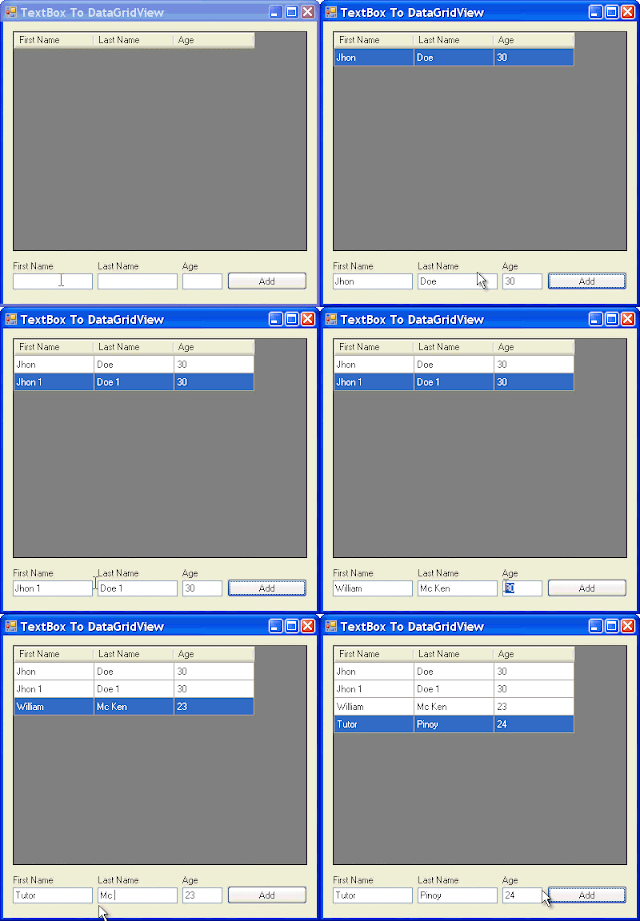
How to Populate Data from Textbox to Datagridview in C#/CSharp

Image
The following example allows you to populate data from a TextBox to DataGridView Control in C#/CSharp. using System; using System.Collections.Generic; using System.Windows.Forms; namespace TextBoxToDataGridView { public partial class Form1 : Form { public Form1() { InitializeComponent(); } private void Form1_Load(object sender, EventArgs e) { DataGridView dgv = this.dataGridView1; //SET DATAGRIDVIEW PROPERTIES dgv.AutoGenerateColumns = false; dgv.AllowUserToAddRows = false; dgv.RowHeadersVisible = false; dgv.MultiSelect = false; //SETS UP THE COLUMN HEADERS dgv.Columns.Add("FName", "First Name"); dgv.Columns.Add("LName", "Last Name"); dgv.Columns.Add("Age", "Age"); } private void btnAdd_Click(object sender, Event...

Populate Website Directory Listing into ListView Control using C#/CSharp

Directory listings are just HTML pages generated by a web server. Each web server generates these HTML pages in its own way because there is no standard way for a web server to list these directories.  The web server you'd like to list directories from must have directory browsing turned on to get this HTML representation of the files in its directories. So you can only get the directory listing if the HTTP server wants you to be able to. [C#] using System; using System.IO; using System.Net; using System.Text; using System.Windows.Forms; using System.Text.RegularExpressions; namespace DirectoryListing { public partial class frmMainDownloader : Form { public frmMainDownloader() { InitializeComponent(); } public static string GetDirectoryListingRegexForUrl(string url) { return "<a href=\".*\">(?<name>.*)</a>"; } private void btnFetchUrl_Click(object ...

Populate Data into DataGridView using DataTable in C#/CSharp

The following snippet allows to populate data into DataGridView Control using DataTable in CSharp. First, we establish a connection to our database. string sConnect = "Data Source=" + Properties.Settings.Default.Server + ";Initial Catalog=" + Properties.Settings.Default.Database + ";"; if (Properties.Settings.Default.UseIntegratedSecurity) sConnect += "Integrated Security=SSPI;"; else sConnect += "User Id=" + Properties.Settings.Default.Username + ";Password=" + Properties.Settings.Default.Password + ";"; this.sSQLConnectString = sConnect; This DataTable returns the Books Table. public DataTable GetBooks() { string sql = "select * from Book order by ISBN13, ISBN10"; SqlDataAdapter da = new SqlDataAdapter(sql, sqlConnection); try { DataTable dt = new DataTable(); da.Fill(dt); return dt; } catch (Exception ex) { throw ex; ...

How to Kill or Start a New Background Process in C#/Csharp

The following snippet allows you to check if a process is already running in the background. If the process is already running it will prompt the user to whether start a new process or continue with the existing one that is running.         private void checkForDataInProgress()         {             if (!this.bConnectedToDatabase)                 return;             Process proc = new Process();             string sNumThreads = Properties.Settings.Default.NumberOfLocalThreads.ToString();             string sProcArgs = "\"" + this.sSQLConnectString + "\" \"" + Properties.Settings.Default.XMLSaveDir + "\" \"" + Properties.Settings.Default.DLLDir + "\" " + sNumThreads;             proc.StartInfo = new ProcessStartInfo(Properties.Settings.Default.DataImporterAp...

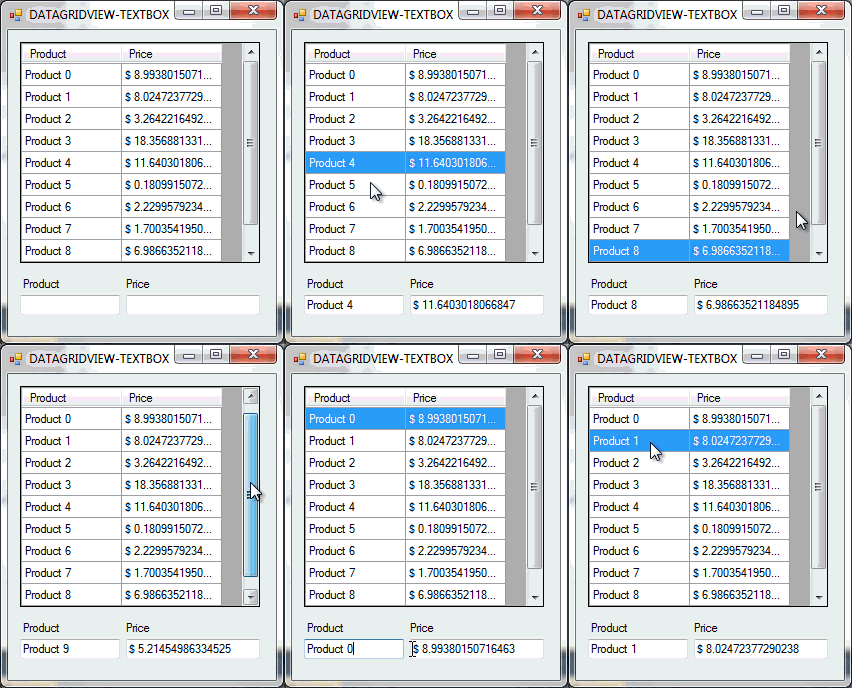
Load Data of DataGridView's Selected Row to TextBox Control in C#/CSharp

Image
The following example loads the data of the Selected Row in a DataGridView control into a TextBox control in CSharp. As shown on the previous example  Populate Data Into DataGridView using For-Loop in C#/CSharp , we'll use that method to fill our DataGridView with data. To begin with: 1.) Start start a new C# project. 2.) Add the following controls onto Form1. (1) DataGridView Control (2) TextBoxes (2) Labels 3.) Open the Windows Form Designer and Update the DataGridView's generated code with the following. // // dataGridView1 // this.dataGridView1.ColumnHeadersHeightSizeMode = System.Windows.Forms.DataGridViewColumnHeadersHeightSizeMode.AutoSize; this.dataGridView1.Location = new System.Drawing.Point(12, 12); this.dataGridView1.Name = "dataGridView1"; this.dataGridView1.Size = new System.Drawing.Size(240, 221); this.dataGridView1.TabIndex = 0; this.dataGridView1.CellClick += new System.Windows.Forms.DataGridViewCellEventHandler(this.dataGridView1_CellC...

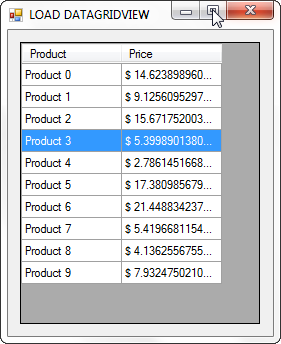
Populate Data Into DataGridView using For-Loop in C#/CSharp

Image
The following example will populate data into a DataGridView Control using For-Loop. To begin with: 1.) Create a new C# Project. 2.) Add a DataGridView Control onto Form1. 3.) Then copy the code below and paste on Form1_Load() event. Random rand = new Random(); DataGridView dgv = this.dataGridView1; //DATAGRIDVIEW SETTING dgv.AllowUserToAddRows = false; dgv.RowHeadersVisible = false; dgv.SelectionMode = DataGridViewSelectionMode.FullRowSelect; //ADD COLUMN HEADERS dgv.Columns.Add("Product", "Product"); dgv.Columns.Add("Price", "Price"); //ADD 10 ROWS dgv.Rows.Add(10); //NOW, POPULATE THE DATA INTO THE CELLS for (int i = 0; i < 10; i++) {     double price = rand.Next(1, 30) * rand.NextDouble();     dgv.Rows[i].Cells[0].Value = "Product " + i;     dgv.Rows[i].Cells[1].Value = "$ " + price; } //CLEARS THE DEFAULT SELECTION WHICH IS THE FIRST ROW dgv.ClearSelection(); 4.) Build and Comp...

How to use Do While Loop and a For Loop Counter in VB.Net

Image
In this tutorial, we'll be working on a real example on how to use Do...While Loop and a For...Loop Counter in VB.Net. Example Description: 1. A customer will be asked to enter the prices of 4 items purchased using an input box (create a counter loop). 2. A tax rate of 7% will be a constant. 3. Subtotal, tax rate, and total will be displayed in labels. 4. An accumulator inside the loop will be used to calculate the subtotal. 5. A pre-test post-test do while loop shall be used to control the limit of entering price. CODE: Public Class Form1 Private Sub btnEnterPrices_Click(ByVal sender As System.Object, ByVal e As System.EventArgs) Handles btnEnterPrices.Click Dim Price As String Dim SubTotal As Double, Tax As Double, Total As Double Dim limit As String, newLimit As String Dim i As Integer, n As Integer, response As Integer 'Prompts the user the input the number of prices to be calculated limit = InputBox(...

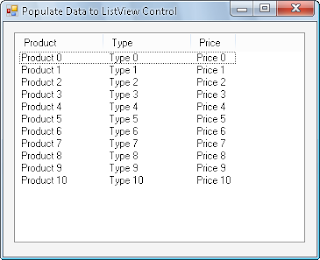
Populate Data into ListView Control in VB.Net

Image
The following example Populates Data into ListView Control in VB.Net when the form is loaded. Add a ListView Control on your Visual Basic Project and add the following code snippet on Form Load event. Public Class Form1 Private Sub Form1_Load(ByVal sender As System.Object, ByVal e As System.EventArgs) Handles MyBase.Load         With ListView1             .View = View.Details             .FullRowSelect = True             'Setup column headers             .Columns.Add("Product", 100)             .Columns.Add("Type", 100)             .Columns.Add("Price", 50)           ...

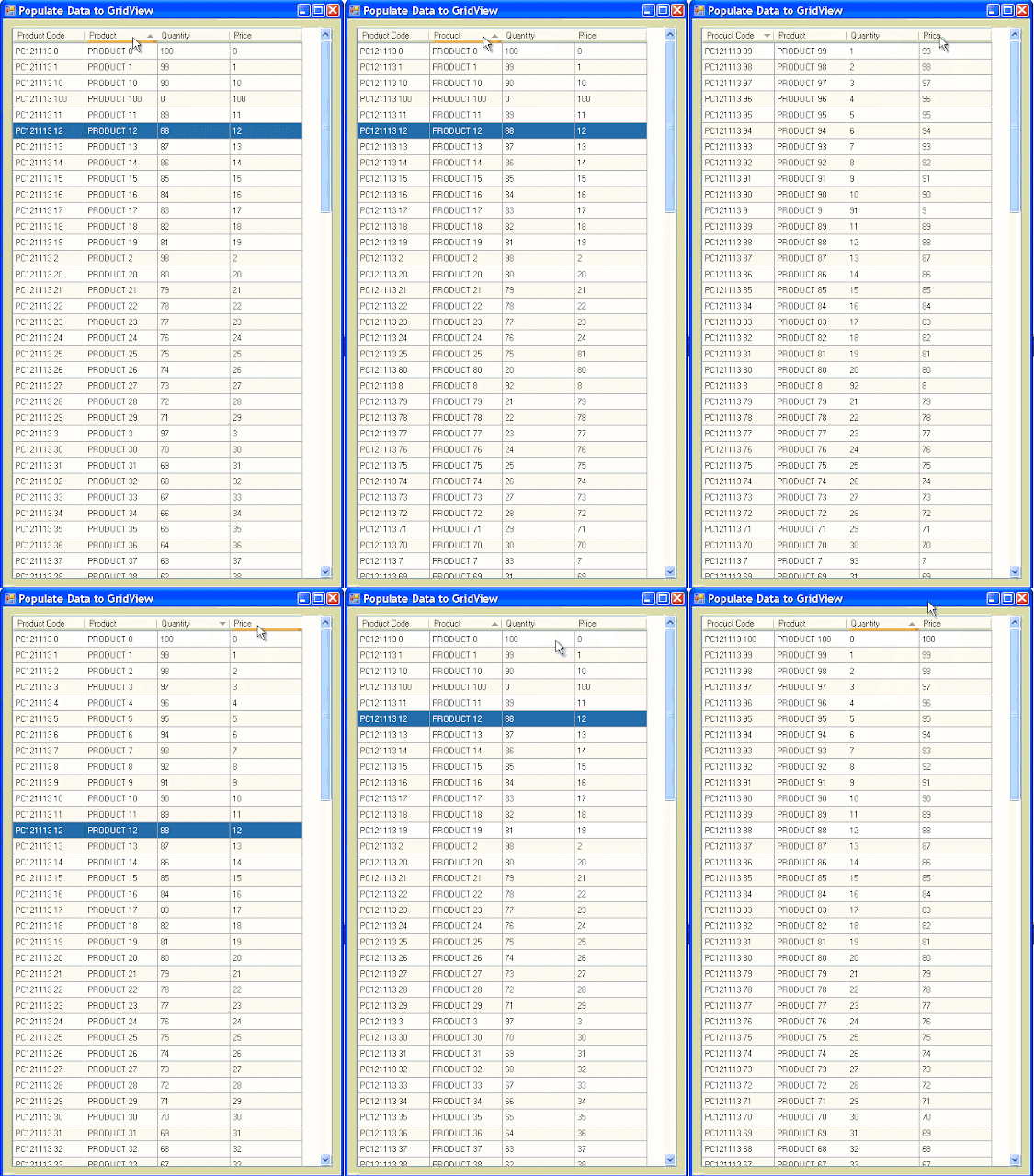
Populate Data into DataGridView Control using For-Loop in VB.Net

Image
The following example shows how to Populate Data to DataGridView Control in VB.Net. Public Class Form1 Private Sub Form1_Load(ByVal sender As System.Object, ByVal e As System.EventArgs) Handles MyBase.Load With dgv 'SET COLUMN HEADERS .Columns.Add("Product Code", "Product Code") .Columns.Add("Product", "Product") .Columns.Add("Quantity", "Quantity") .Columns.Add("Price", "Price") 'START POPULATING DATA ROWS IN GRIDVIEW For i As Integer = 0 To 100 .Rows.Add() .RowHeadersVisible = False .Item(0, i).Value = "PC121113 " & i .Item(1, i).Value = "PRODUCT " & i .Item(2, i).Value = 100 - i .Item(3, i).Value = i Next .SelectionMode = DataGridViewSelectionMod...

Implement a Graph from ASCII Data to Chart Windows Form Control using VB.NET

Image
The example below is a simple way on how to Plot a Graph in Chart Windows Form Control using VB.Net. Requirements: 1. Microsoft Visual Studio (In my case, I'm using Visual Studio 2010 Express Edition). To Begin with: 1. Start your Microsoft Visual Basic 2010 Express. 2. In the New Project window, Choose " Windows Form Application " and name it to whatever you like or something like " Plot Graph " then Click " OK ". 3. You must now be able to see the Form. On the toolbox Add the following controls onto the form and update its properties.      a. Form : Name := frmGraph      b. (1) Chart : Name := Chart1      c. (1) Textbox : Name := txtData , Multiline:= True , Text := 30;52;57;57;68;93;129;173;209;232;240;232;217;196;169;141;116;98;86;80;78;76;76;79;81;83;86;91;95;97;95;93;95;99;103;105;106;107;110;116;120;122;123;124;127;132;137;139;137;136;132;126;124;122;117;113;110;105;97      d. (1) Button ...

Always Show Selected Row of a DataGridView in C# / CSharp

The following codes will always Show the Selected Row of a DatagridView when the data is reloaded and will recall the state of the scrollbar by its scroll value.. CODE: private int scrollVal = 0, rowIndex = 0, lastRow = 0; private void datagridView1_Scroll(object sender, EventArgs e)     {         //WILL USE THE SCROLL VALUE LATER WHEN RELOADING THE DATAGRIDVIEW         scrollVal = datagridView1.VerticalScrollingOffset;     } private void datagridView1_CellClick(object sender, DataGridViewCellEventArgs e)     {         //GETS THE INDEX OF THE CURRENT SELECTED ROW         rowIndex = this.datagridView1.CurrentRow.Index;         rowIndex = rowIndex != 0 ? lastRow = rowIndex : lastRow = rowIndex;     } private void reloadDatagridView()     {     ...